 |
Gbox 4.20
Grow box automation and monitoring - <a href='https://sites.google.com/site/growboxguy/'>https://sites.google.com/site/growboxguy/</a>
|

|
|
Gbox 4.20
Grow box automation and monitoring - <a href='https://sites.google.com/site/growboxguy/'>https://sites.google.com/site/growboxguy/</a>
|
|
#include <ELClientWebServer.h>
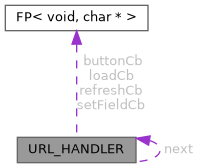
Data Fields | |
| String | URL |
| the URL to handle | |
| FP< void, char * > | loadCb |
| Callback for HTML page loading. | |
| FP< void, char * > | refreshCb |
| Callback for HTML page refresh. | |
| FP< void, char * > | setFieldCb |
| callback for setting a field from a HTML form | |
| FP< void, char * > | buttonCb |
| callback for a HTML button press | |
| struct URL_HANDLER * | next |
| next handler | |
Web Server URL handler structure.
Definition at line 17 of file ELClientWebServer.h.
| FP<void, char*> URL_HANDLER::buttonCb |
callback for a HTML button press
This callback is called when user presses a HTML button. After processing this callback, a page refresh will also be called to reflect the changes.
| button_id | The ID of the button |
Definition at line 113 of file ELClientWebServer.h.
| FP<void, char*> URL_HANDLER::loadCb |
Callback for HTML page loading.
This callback is called when browser loads a custom page for the first time. The callback should populate all the fields that are required for displaying the page.
| url | The URL of the page to load. |
Definition at line 38 of file ELClientWebServer.h.
| struct URL_HANDLER* URL_HANDLER::next |
next handler
Definition at line 114 of file ELClientWebServer.h.
| FP<void, char*> URL_HANDLER::refreshCb |
Callback for HTML page refresh.
This callback is called when browser refreshes a page. The callback should populate all the fields that are required for displaying changes on the page.
| url | The URL of the page to load. |
Definition at line 56 of file ELClientWebServer.h.
| FP<void, char*> URL_HANDLER::setFieldCb |
callback for setting a field from a HTML form
This callback is called when a HTML form is submitted. The callback should save field changes. After processing the callback, a page refresh will also be initiated to reflect the changes.
The size of the receive buffer on ELClient is 128 bytes which can be small for receiving a large form. When the data exceeds 128 bytes, Esp-Link segments the query into smaller parts. If the callback is slow, it's possible that the UART buffer overruns while receiving the next packet causing data loss. The callback has 5ms to process the request if data comes at 115200 baud.
If debugging is enabled, data loss is very likely to happen because of packet logging.
| field_id | The ID of the field |
Definition at line 92 of file ELClientWebServer.h.
| String URL_HANDLER::URL |
the URL to handle
Definition at line 20 of file ELClientWebServer.h.
 1.9.8
1.9.8